

Quick Facts Table
| Detail | Information |
| Dell warranty portal | dell.com/support |
| HP warranty portal | support.hp.com/checkwarranty |
| Lenovo warranty portal | pcsupport.lenovo.com/warrantylookup |
| HPE warranty portal | partsurfer.hpe.com |
| Standard consumer warranty | 1 year (most brands) |
| ThinkPad standard | 3 years depot on many models |
| Dell serial (Service Tag) | 5-7 character alphanumeric |
| HP serial location | Bottom sticker or in support app |
| Lenovo serial location | Bottom sticker or Lenovo Vantage app |
| Command line lookup | wmic bios get serialnumber |
Why Check Your Warranty
Every laptop comes with a manufacturer warranty. It usually covers manufacturing defects for one year from purchase.
A quick check saves you from surprise repair costs. It also confirms the exact end date so you know when to buy an extension. IT teams also check warranty status before shipping devices to remote workers. Second-hand buyers should verify coverage before paying for any used laptop. Every method below is free and takes under a minute.
Where To Find Your Serial Number
Your serial number or service tag is the key to any warranty lookup. Every brand has multiple ways to find it.
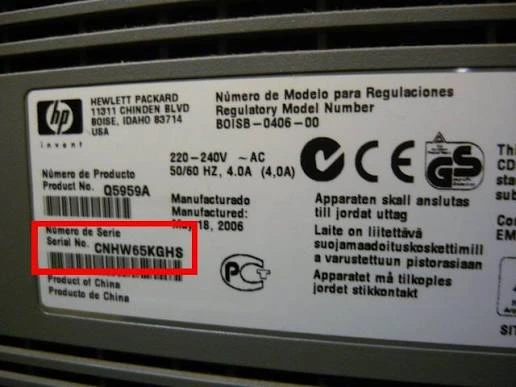
Check the sticker on the bottom of the laptop first. Look near the hinge or under a battery flap on some models. On Windows, open Command Prompt and type wmic bios get serialnumber, then press Enter. PowerShell users can type Get-CimInstance win32_bios and press Enter. Modern devices also show the serial in BIOS or UEFI, in Settings, or through the maker’s support app.
Check Warranty For Dell
Dell uses a five to seven character Service Tag as the serial number equivalent. This tag is the fastest lookup key.










Follow these simple steps. Open dell.com/support in your browser. Find the Identify Your Product box on the homepage. Enter your Service Tag or Express Service Code. Press Search to load the warranty page. A dell warranty check here shows the end date, coverage type, and any active ProSupport plan. This process is as safe as a fab balance check portal, since it uses HTTPS and no login is needed for the basic check.
Dell offers standard warranty, ProSupport, and ProSupport Plus tiers. Each adds different next-business-day repair options and accidental damage cover. The SupportAssist app also picks up your Service Tag automatically if installed.
Check Warranty For HP
HP uses a serial number and a product number for warranty lookups. Both sit on the sticker under the laptop.
Open support.hp.com in your browser. Click Check Warranty from the top menu. Enter your serial number or product number in the search box. Press Submit to see the warranty details. An hp laptop warranty check on the same page works for every HP laptop line, including Pavilion, Envy, and Spectre. If you need to prove ownership, an hp warranty check serial number result also lists the model name and purchase country. Standard hp warranty check tools return the coverage end date and any Care Pack extension in seconds. Payment for extension packs works like a secure fab salary check session in a banking app.
Check Warranty For Lenovo
Lenovo uses a serial number and machine type for warranty tracking. Both are printed on the bottom of the laptop.
Visit pcsupport.lenovo.com in your browser. Click Warranty Lookup on the homepage. Enter your serial number or machine type. Press Continue to see full warranty details. A quick lenovo warranty check here shows the standard cover, any Premium Care plan, and repair history. A lenovo warranty check serial number result also lists the machine type, model, and country of purchase. This lookup works even faster than a lulu balance check at a store counter.
Lenovo Vantage app installed on the laptop also picks up the serial automatically. Open the app and tap Warranty to see the same info.
Standard Cover Term On Lenovo
Lenovo laptops carry different default warranty periods based on the line. Knowing the exact term saves you from confusion.
The standard lenovo laptop warranty period is one year for most consumer models like IdeaPad and Legion. ThinkPad business laptops often come with a longer three-year depot warranty. Premium Care and Premium Care Plus extend coverage up to five years with accidental damage support. Confirm your exact term on the lookup page before you plan any upgrade.
HP Server And HPE Warranty
Enterprise HP hardware sits under HPE, a separate brand. Warranty checks use a different portal.
Visit partsurfer.hpe.com or support.hpe.com in your browser. Enter your serial number or product number. Press Search to see server warranty details. An hp server warranty check for ProLiant and BladeSystem also shows firmware update entitlements. An hpe warranty check for storage, networking, and rack servers works the same way. IT admins often bookmark this page for fleet management.
Lenovo Monitor Warranty
Monitors also carry a warranty, though the term is often different. Lenovo covers this on the same lookup tool.
Find the serial on the back of the monitor or in the settings menu. A quick lenovo monitor warranty check on pcsupport.lenovo.com shows the term and any active service plan. Some ThinkVision monitors carry a longer three-year cover than typical consumer displays. Keep the receipt handy in case Lenovo asks for proof.
Extend Or Upgrade Coverage
Every major brand offers extension plans. Buying early saves money and stress later.
Dell ProSupport and ProSupport Plus add next-business-day service and accidental damage cover. HP Care Pack adds hardware coverage for up to five years. Lenovo Premium Care includes priority tech support and on-site repair. Prices vary by device model and cover length. Payment on the maker’s site works like a secure al ansari balance check, where the confirmation clears only after the transfer.
Buy the extension before your standard warranty ends. Most brands charge more for a plan added later. Some regions also require a working device inspection for late signups.
Troubleshooting: Wrong Or Missing Data
Sometimes the lookup returns a blank page or wrong device. Common issues have simple fixes.
Double-check that you typed the tag correctly, since one wrong character breaks the search. Older devices may take a few minutes to sync with the support database. Bus and metro travellers can track prepaid balance the same way through the hafilat card balance check service. Delays here are similar to a ratibi card balance check, where a top-up takes a short while to reflect after transfer.
Support and government systems are separate. Use an rta fine check on rta.ae for Dubai traffic penalties before any work travel. A dubai police fine check on the police site handles police-issued fines the same way. Some countries block travellers with unpaid fines from exit. If the warranty lookup still shows wrong device data, call brand support directly with your purchase receipt.
Safety And Compliance Tips
Protect your device and data with a few simple habits. Only use the official maker’s site for warranty lookups. Never share your serial number with third-party sellers claiming to offer better cover. Keep your purchase invoice in a cloud folder for any future claim. Register the laptop under your name during setup to avoid ownership disputes later. Turn on BitLocker or FileVault to keep data safe if the device goes for repair.
Frequently Asked Questions
How do I check my Dell laptop warranty?
Open dell.com/support and enter your Service Tag or Express Service Code. The warranty end date and cover type load in seconds.
Where is the serial number on my HP laptop?
Look at the sticker on the bottom of the laptop or in the HP Support app. You can also open Command Prompt and type wmic bios get serialnumber.
How do I check my Lenovo laptop warranty?
Visit pcsupport.lenovo.com/warrantylookup and enter your serial number or machine type. Details load right away with the cover end date.
What is the standard laptop warranty period?
Most consumer laptops carry one year of manufacturer cover. Business lines like ThinkPad and Latitude often carry three years by default.
Can I extend my laptop warranty after purchase?
Yes. Dell ProSupport, HP Care Pack, and Lenovo Premium Care all offer extensions of up to five years. Buy early for the best price.
Can I check warranty without turning on the laptop?
Yes. Read the Service Tag or serial from the sticker at the bottom. Enter it on the maker’s website from another device.
Does the warranty transfer to a new owner?
Yes for most brands. Update the ownership record on the support site or contact the maker for a manual transfer before you buy a used device.
Save your Service Tag or serial number in a secure notes app the day you unbox your laptop. This makes any future laptop warranty check a two-tap task instead of a hunt for stickers. Add a calendar reminder a month before your standard cover ends so you can shop for an extension in good time.
