

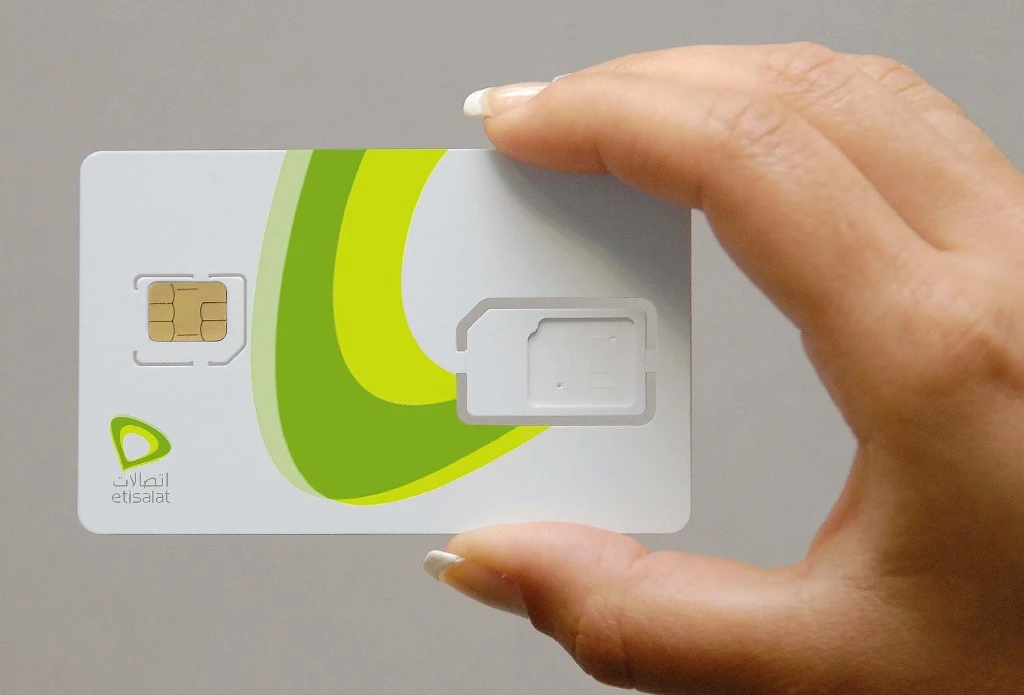
In the UAE, Etisalat (now known as e&) offers multiple simple ways to retrieve your phone number instantly. You don’t need technical skills or special apps, just a few seconds and your phone.

This guide walks you through every method to check your Etisalat number, from quick USSD codes that work without internet to using the e& UAE app and website. We’ll also cover alternative options like checking your SIM packaging or contacting customer service.
You can choose the fastest solution or pick a method that works best in your specific situation. You’ll find the answer here. Each method includes step-by-step instructions, so you can retrieve your number right now and get back to what matters.










Let’s start with the quickest method that works for everyone.
Quick Method: Check Etisalat Number Using USSD Code
The USSD code method is the fastest and most convenient way to find your Etisalat number. You don’t need internet, apps, or account credentials—just your phone with the Etisalat SIM card inserted.
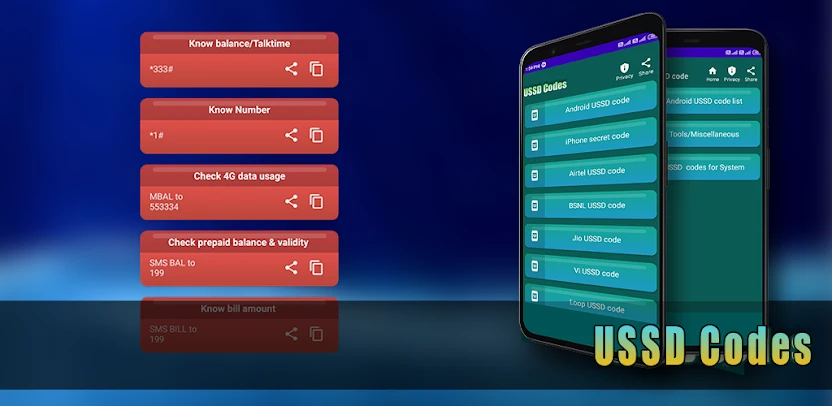
Step-by-Step Instructions for USSD Code
Follow these simple steps to check your number instantly:
Step 1: Open your phone’s dialer (the app you use to make calls)
Step 2: Type *101# on the keypad.
Step 3: See the available options, type 1 for “Account Management” and press Send.
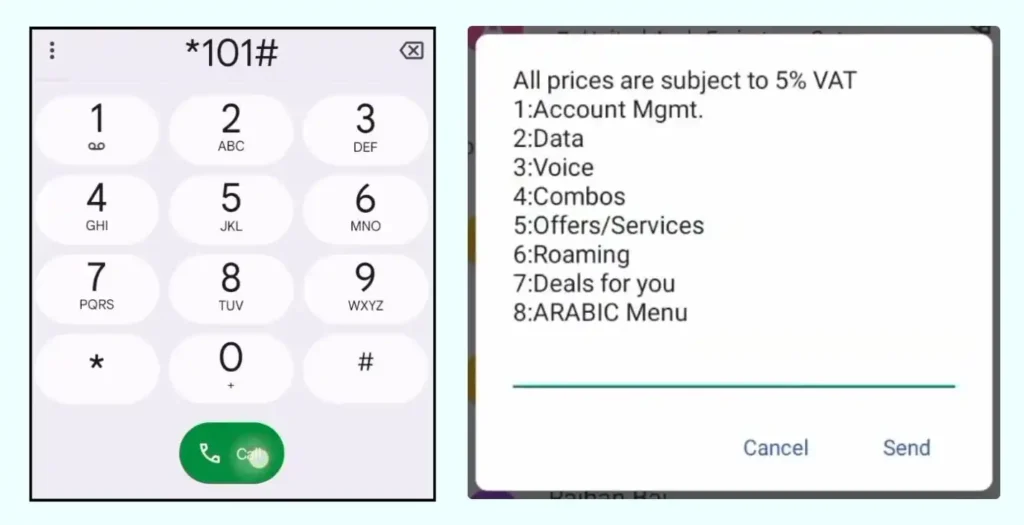
Step 3: Now its time to Press 3 for “Account Information”.
Step 4: Now Finally, type 3 again for “Know My Number” and click Send Button.
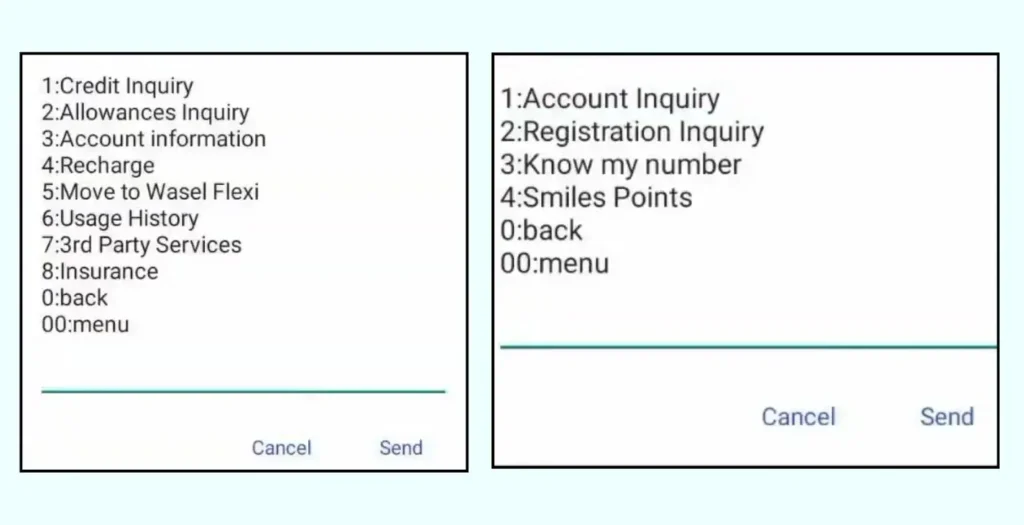
Step 5: Wait 2-3 seconds for the response
The entire process takes less than 10 seconds. Your number displays immediately—no need to wait for an SMS or navigate through menus. Write it down or save it in your contacts right away.
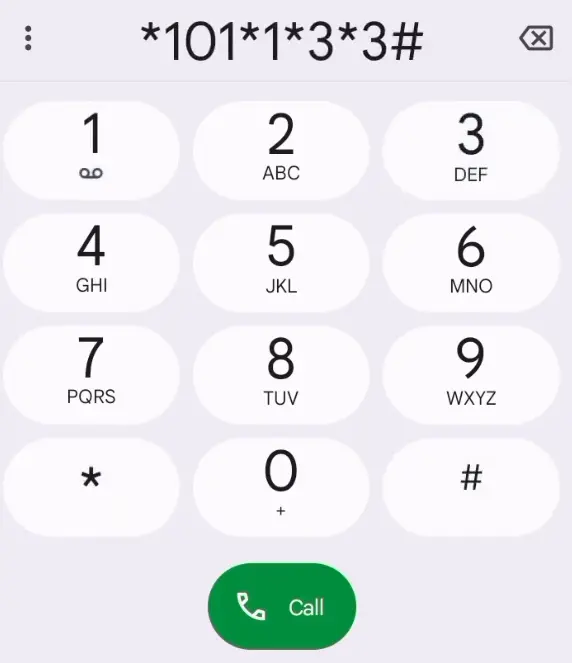
Use The Shortcut Code to Find Your Etisalat Number
| Telecom Network | Check Number Code |
|---|---|
| Etisalat | *101*1*3*3# |
Why USSD Code is the Fastest Option
The USSD method offers several advantages that make it the preferred choice for most users:
Works completely offline – You don’t need an internet connection or mobile data. This makes it perfect when you’re in areas with poor connectivity or want to save data.
Instant results – Unlike apps that need loading time or websites that require login, USSD codes display your number within seconds.
No installation required – You don’t need to download apps, create accounts, or remember passwords. Just dial and done.
Available 24/7 – The service works anytime, anywhere in the UAE, even during system maintenance that might affect apps or websites.
Completely free – Etisalat doesn’t charge anything for checking your own number using USSD codes.
This method works on all phone types—smartphones, basic feature phones, Android, or iOS devices. As long as your Etisalat SIM card is active and inserted in your phone, the code will work.
Troubleshooting Common USSD Code Issues
Problem: “Connection problem or invalid MMI code” error appears
- Ensure your Etisalat SIM card is properly inserted and active
- Restart your phone and try again
- Check if you’ve enabled airplane mode by mistake (turn it off)
- Verify you’re typing the correct code: *135*0# (not *1350# or *135#)
Problem: Nothing happens after dialing the code
- Wait 10-15 seconds—some phones take longer to process
- Try the alternative code: *232#
- Check if your SIM card is locked (unlock it using your PIN)
- Your network signal might be weak—move to an area with better coverage
Problem: The response is in Arabic and you can’t understand it
- The number itself will still display clearly (UAE numbers start with 050, 052, 054, 055, 056, or 058)
- Change your phone’s language settings to English, then try the code again
- Use the e& UAE app instead (covered in the next section)
Problem: Code works but shows a different number
- You might have multiple SIMs inserted—make sure you’re using the Etisalat SIM
- Check which SIM slot you’re dialing from on dual-SIM phones
- The displayed number is correct—if it looks unfamiliar, you might be thinking of a different number
Find Your Etisalat Number Through the e& UAE App
The e& UAE app (formerly Etisalat app) gives you complete control over your mobile account. Beyond checking your number, you can manage your balance, pay bills, and monitor data usage—all from one convenient location.
How to Download and Install e& UAE App
Getting the app takes just a few minutes:
For iPhone Users:
Step 1: Open the App Store on your iPhone
Step 2: Tap the search icon and type “e& UAE”
Step 3: Look for the official app with the red e& logo
Step 4: Tap “Get” then confirm with Face ID, Touch ID, or your Apple ID password
Step 5: Wait for the download to complete (app size: approximately 150 MB)
For Android Users:
Step 1: Open Google Play Store on your phone
Step 2: Tap the search bar and type “e& UAE”
Step 3: Select the official e& UAE app from the results
Step 4: Tap “Install” and accept the permissions
Step 5: The app will download and install automatically (size: approximately 120 MB)
System Requirements:
- iOS 12.0 or later for iPhones
- Android 6.0 or later for Android devices
- Active internet connection for download
- At least 200 MB free storage space
The app is completely free to download. You won’t pay any charges for installation or usage.
Steps to Check Your Number in the App
Once you’ve installed the app, follow these steps:
Step 1: Open the e& UAE app on your phone
Step 2: On the welcome screen, tap “Login” (if you already have an account) or “Register” (for new users)
For New Users – Registration Process:
- Enter your Etisalat mobile number
- Create a secure password (minimum 8 characters)
- Enter the OTP (one-time password) sent to your number via SMS
- Accept the terms and conditions
- Tap “Complete Registration”
For Existing Users:
- Enter your registered mobile number or email
- Type your password
- Tap “Login”
Step 3: Once logged in, you’ll see the main dashboard
Step 4: Your Etisalat number appears at the top of the home screen, usually below “My Account” or in the profile section
Step 5: Tap on your profile icon (top right corner) to see your full number and account details
The app displays your number prominently on multiple screens, so you can’t miss it. You can also take a screenshot for future reference.
Quick Tip: If you’re registering for the first time, you need to receive an SMS on your Etisalat number. Make sure your phone can receive messages before starting the registration process.
Read Also: Check NOL Card Balance Online
Fast, Free & Instant
Additional Features of the e& UAE App
The app offers much more than just showing your number. Here are valuable features you can use:
Check Your Balance Instantly
- View your current balance on the home screen
- See remaining data, minutes, and SMS allowances
- Get notifications when your balance runs low
Pay Bills Easily
- View current and past bills
- Pay directly through the app using credit/debit cards
- Set up automatic payments to never miss a due date
- Download bill PDFs for your records
Monitor Data Usage
- Track how much data you’ve used this month
- See which apps consume the most data
- Get alerts when you reach 80% or 90% of your data limit
- View detailed usage history by day or week
Recharge Your Account
- Top up prepaid credit instantly
- Choose from various recharge amounts
- Use saved payment methods for quick refills
- Send credit to friends or family members
Manage Your Plan
- View your current package details
- Upgrade or change your plan
- Add data boosters or extra services
- See when your plan renews
Customer Support
- Chat with support agents directly in the app
- Browse FAQs and help articles
- Request callbacks from customer service
- Track your service requests
Store Locator
- Find nearby Etisalat stores
- Get directions and opening hours
- Book appointments for in-store visits
The app saves you time by putting everything you need in one place. You won’t need to call customer service or visit stores for basic account management.
Troubleshooting App-Related Issues
Problem: Can’t receive the OTP during registration
- Ensure your SIM card is properly inserted and active
- Check if you have network signal
- Wait 2-3 minutes—SMS might be delayed
- Request a new OTP by tapping “Resend Code”
- Try registering using the website instead
Problem: App keeps crashing or won’t open
- Update to the latest version from the App Store or Play Store
- Clear the app cache (Settings > Apps > e& UAE > Clear Cache)
- Restart your phone
- Uninstall and reinstall the app
- Check if your phone’s operating system needs an update
Problem: Forgot your app password
- On the login screen, tap “Forgot Password”
- Enter your registered mobile number
- You’ll receive a password reset link via SMS
- Create a new password and login again
Problem: Number not displaying after login
- Pull down on the home screen to refresh
- Log out and log back in
- Check your internet connection
- Contact customer support through the app’s chat feature
Check Etisalat Number on the Official Website
If you prefer using a computer or don’t want to install an app, the Etisalat website offers a simple way to check your number online. This method works on any device with internet access and a web browser.
H3: Using the Etisalat Web Portal

Follow these steps to find your number through the official website:
Step 1: Open your web browser (Chrome, Safari, Firefox, or Edge)
Step 2: Visit the official website: www.etisalat.ae or www.eand.ae
Step 3: Click on “Login” in the top right corner of the homepage
Step 4: Enter your credentials:
- Type your Etisalat mobile number or registered email address
- Enter your password
- Click “Sign In”
Step 5: Once logged in, you’ll land on your account dashboard
Step 6: Your Etisalat number appears at the top of the page under “Account Overview” or “My Profile”
Step 7: Click on “My Account” or “Profile Settings” to see complete account details including your full number
For First-Time Users:
If you haven’t registered on the website before:
- Click “Register” instead of “Login”
- Enter your Etisalat mobile number
- Create a strong password
- Verify your identity with the OTP sent to your phone
- Complete the registration form
- Submit and login
Once registered, you can access your account anytime from any device. The website remembers your login on trusted devices if you check “Remember Me.”
Alternative Access Points:
Your number also appears in these website sections:
- Billing section (top of your bill)
- Profile settings page
- Usage and recharge history
- Plan details page
You can download or print your account summary as a PDF, which includes your number for future reference.
Requirements for Web Access
Before using the website method, make sure you have:
Internet Connection
- Stable WiFi or mobile data connection
- Minimum speed of 1 Mbps for smooth loading
- Works on home broadband, office WiFi, or mobile hotspots
Account Credentials
- Your registered email address or mobile number
- The password you created during registration
- Access to your phone for OTP verification (first-time login)
Browser Compatibility
The Etisalat website works best on:
- Google Chrome (version 90 or newer)
- Safari (version 14 or newer)
- Mozilla Firefox (version 88 or newer)
- Microsoft Edge (version 90 or newer)
Update your browser if you experience loading issues or features don’t work properly.
Device Requirements:
- Desktop computer, laptop, tablet, or smartphone
- Screen resolution of at least 1024×768 for best viewing
- JavaScript enabled in browser settings
- Cookies enabled for login functionality
Security Note: Always access the website from secure networks. Avoid using public WiFi for logging into your account. If you must use public networks, consider using a VPN for added security.
The website method works well when you’re at your computer or prefer larger screens for managing your account. You get the same features as the mobile app but with a more spacious interface.
Troubleshooting Website Access Issues
Problem: “Invalid credentials” error when logging in
- Double-check your mobile number or email (no extra spaces)
- Verify your password is correct (passwords are case-sensitive)
- Try the “Forgot Password” option to reset your password
- Clear your browser cookies and cache, then try again
- Ensure Caps Lock is off when typing your password
Problem: Website won’t load or keeps showing errors
- Check your internet connection is working
- Try a different browser
- Clear your browser cache and cookies
- Disable browser extensions or ad blockers temporarily
- Try accessing the website in incognito/private browsing mode
- Restart your router if using home WiFi
Problem: Not receiving OTP for verification
- Check if your phone has network signal
- Wait 5 minutes—SMS delivery can be delayed
- Request OTP again using the “Resend” button
- Verify you entered the correct mobile number
- Check if your message inbox is full (delete old messages)
- Contact customer service if OTP still doesn’t arrive after 10 minutes
Problem: Account locked after multiple login attempts
- Wait 30 minutes before trying again
- Use the “Forgot Password” option to reset your password
- Contact customer support at 101 for immediate assistance
- Visit an Etisalat store with your Emirates ID for account recovery
Problem: Website displays in Arabic
- Look for the language selector (usually top right corner)
- Click on “EN” or “English” to switch languages
- Change your browser’s default language settings
- Clear cookies and reload the page
Problem: Can’t see your number after logging in
- Refresh the page (press F5 or click the refresh button)
- Navigate to “My Account” or “Profile” section
- Log out completely and log back in
- Try accessing from a different device
- Contact customer support through live chat on the website
Alternative Methods to Find Your Etisalat Number
Sometimes you need creative solutions when standard methods don’t work. These alternative approaches help you find your Etisalat number even without USSD codes, apps, or internet access.
Call Another Phone Number
This old-school method works perfectly when you have access to another phone:
Step 1: Grab a friend’s phone, family member’s device, or any other mobile phone
Step 2: Use your Etisalat SIM to call that other number
Step 3: The person receiving the call will see your number displayed on their screen (caller ID)
Step 4: Ask them to read your number back to you or save it as a contact
Step 5: Write down your number immediately
Tips for This Method:
- Call a landline if available—many display caller ID on screen
- Use your office phone or home phone
- Call someone who will answer quickly
- Take a photo of the caller ID screen for your records
- This method is completely free (standard call charges apply)
What if caller ID doesn’t show?
Some phones or networks hide caller ID by default. If this happens:
- Ask the person to check their recent call log
- Your number appears in “Received Calls” or “Call History”
- Even blocked or private numbers usually show in call logs
This method works internationally too. If you’re traveling abroad, call a local number and check the caller ID display.
Check Your SIM Card Packaging
Your Etisalat number is printed right on your original SIM card packaging. Here’s where to look:
On the SIM Card Box:
- Front of the box usually displays your mobile number
- Look for a label that says “Mobile Number” or “Phone Number”
- The number typically appears near the barcode
- It’s often printed in large, bold digits for easy reading
On the SIM Card Holder:
- The plastic card your SIM was attached to
- Check both sides of the card
- Your number appears alongside the SIM card serial number
- Usually printed in black or blue ink
On the Welcome Letter:
- Etisalat includes a welcome document with new SIM cards
- Your number is listed in the account details section
- Check the top right corner of the letter
- The document also shows your plan information
On the Purchase Receipt:
- If you bought the SIM from a store, check your receipt
- Your activated number appears on the transaction slip
- Look under “Service Details” or “Account Information”
What if you lost the packaging?
- Check if you took a photo of the SIM card when you first got it
- Look through your email for activation confirmation from Etisalat
- Check your phone’s photo gallery for any pictures of the SIM box
- Contact the store where you purchased it (they might have records)
Pro Tip: When you get a new SIM card, immediately take a photo of the packaging showing your number. Store it in a secure folder on your phone or cloud storage. This saves you trouble later.
Review Your Paper or Email Bill
Etisalat sends monthly bills that always display your mobile number prominently:
On Paper Bills:
Step 1: Locate your most recent Etisalat bill (monthly statement)
Step 2: Look at the top of the first page
Step 3: Your mobile number appears in the “Account Details” section
Step 4: It’s usually right below your name and above your address
The bill shows your complete number in this format: +971 XX XXX XXXX or 0XX XXX XXXX
On Email Bills (E-Bills):
Step 1: Open your email inbox
Step 2: Search for “Etisalat” or “e& UAE” or “bill”
Step 3: Open the most recent bill email
Step 4: Your number appears in the email subject line or body
Step 5: Download the attached PDF bill
Step 6: Open the PDF and check the first page header
Where exactly to look on bills:
- Top right corner (most common location)
- “Account Summary” section
- Next to “Service Number” or “Mobile Number”
- Above your billing address
- In the account overview table
Can’t find your bills?
- Check your spam or junk folder for emails
- Look in physical mailboxes if you receive paper bills
- Login to the e& UAE app to download past bills
- Access the Etisalat website and navigate to “Billing History”
- Contact customer service to request bill copies
Bills contain other useful information too, like your plan details, usage summary, and payment history. Keep at least the last three months of bills for your records.
Contact Etisalat Customer Service
When all else fails, Etisalat’s customer service team can help you retrieve your number:
Call Customer Service:
Step 1: Dial 101 from any Etisalat number (free call)
Step 2: Wait for the automated menu
Step 3: Press the appropriate number for customer service (usually “0” for operator)
Step 4: Explain that you need to find your mobile number
Step 5: Provide identification details:
- Your full name as registered
- Emirates ID number
- Date of birth
- Registered address
Step 6: The agent will verify your identity and provide your number
Alternative Customer Service Numbers:
- From other networks: 800 101 (toll-free)
- From abroad: +971 4 390 1101
- Business customers: 800 5800
Use Live Chat:
Step 1: Visit www.etisalat.ae or www.eand.ae
Step 2: Click the chat icon (bottom right corner)
Step 3: Start a conversation with the chatbot
Step 4: Type “I need to know my mobile number”
Step 5: Follow the prompts or request a human agent
Step 6: Provide your account details for verification
Live chat operates 24/7 and usually responds within 2-3 minutes.
Visit an Etisalat Store:
Step 1: Find your nearest Etisalat business center using the store locator on their website
Step 2: Bring your Emirates ID or passport
Step 3: Explain to the customer service representative that you need your number
Step 4: They’ll access your account and provide your number immediately
Step 5: You can also request a printed account summary
Store visits work best for complex issues or if you need additional account services. Most stores open from 8:00 AM to 10:00 PM daily.
Email Support:
Send an email to customercare@etisalat.ae with:
- Your full name
- Emirates ID number
- Approximate date of SIM activation
- Request to retrieve your mobile number
Response time: 24-48 hours
Social Media Support:
Etisalat responds to queries on:
- Twitter: @etisalat
- Facebook: Official Etisalat UAE page
- Instagram: @etisalatuae
Send a direct message explaining your situation. Include your account details but never share passwords or sensitive information publicly.
Important: Always have your Emirates ID or passport ready when contacting customer service. They need to verify your identity before sharing account information.
Understanding Etisalat and e& UAE
If you’re confused about the name change or what Etisalat actually is, this section clears up everything you need to know about the UAE’s leading telecommunications provider.
What is Etisalat?
Etisalat is the largest telecommunications company in the United Arab Emirates and one of the biggest in the Middle East region.
Company Background:
Founded in 1976, Etisalat has served UAE residents and businesses for nearly 50 years. The company provides essential communication services that connect millions of people across the country.
Services Offered:
Mobile Services:
- Prepaid and postpaid mobile plans
- 4G and 5G network coverage
- International roaming in over 190 countries
- Voice calls, SMS, and mobile data
Home Internet:
- High-speed fiber optic broadband
- Home WiFi solutions
- Various speed packages from 50 Mbps to 1 Gbps
- Unlimited data options
Television Services:
- eLife TV packages
- HD and 4K channels
- Sports, movies, and entertainment content
- Video on demand and catch-up TV
Business Solutions:
- Corporate mobile plans
- Enterprise internet connectivity
- Cloud services and data centers
- IoT (Internet of Things) solutions
Market Position:
Etisalat serves over 12 million mobile subscribers in the UAE alone. The company operates in 16 countries across Asia, the Middle East, and Africa. In the UAE, Etisalat competes primarily with du (the second major telecom provider).
Network Quality:
Etisalat consistently ranks among the world’s fastest mobile networks. The company launched 5G services in 2019, making the UAE one of the first countries with nationwide 5G coverage. Users enjoy reliable connectivity in cities, highways, and remote areas.
Customer Base:
The company serves:
- Individual consumers (prepaid and postpaid)
- Small and medium businesses
- Large corporations and government entities
- Tourists and visitors (temporary SIM cards)
Etisalat’s extensive infrastructure makes it the go-to choice for many UAE residents who prioritize network reliability and comprehensive coverage.
The Difference Between Etisalat and e& Branding
You might notice both “Etisalat” and “e&” used interchangeably. Here’s what happened:
The Rebranding Explained:
In February 2022, Etisalat Group announced a major rebrand to “e&” (pronounced “e and”). This marked one of the biggest telecommunications rebrands in the region.
What Changed:
Visual Identity:
- New logo: A simple red “e&” symbol replaced the classic green Etisalat logo
- Fresh color scheme: Red became the primary brand color
- Modern design: Sleeker, more contemporary look
- Updated store signage and marketing materials
Company Structure:
The rebrand reflected the company’s evolution:
- “e&” represents the parent group operating internationally
- “Etisalat by e&” is the consumer brand in the UAE
- The change signaled expansion beyond traditional telecom services
Services Remain the Same:
Nothing changed for customers:
- Your phone number stayed exactly the same
- All existing plans and packages continued without interruption
- Network quality and coverage remained identical
- Customer service processes stayed the same
- All account details and balances transferred automatically
Why Both Names Still Exist:
You’ll see both names used because:
“e&” is used for:
- The parent company and group level
- International operations
- Corporate communications
- New marketing campaigns
- The mobile app (now called “e& UAE”)
“Etisalat” is still used for:
- Legacy systems and older documents
- Some customer service communications
- Historical references
- Many people’s everyday conversations
- USSD codes and technical systems
In Practice:
When you dial customer service, they might answer “Welcome to e& UAE” or “Welcome to Etisalat”—both are correct. Your bills might show “Etisalat by e&” at the top. Store signs display the new e& branding, but staff understand if you say “Etisalat store.”
What to Call It:
You can use either name:
- “My Etisalat number” ✓
- “My e& number” ✓
- “My Etisalat by e& number” ✓
All three are perfectly acceptable. Most people still say “Etisalat” out of habit, and everyone understands what you mean.
The Bottom Line:
Think of it like this: It’s the same company, same network, same services—just a new name and look. Your experience as a customer didn’t change at all. The rebrand happened at the corporate level while customer services continued seamlessly.
If someone mentions “e&” and you’re confused, just remember it’s the new name for the Etisalat you’ve always known. The transition is gradual, so both names coexist comfortably in everyday use.
Comparison of All Methods to Check Etisalat Number
| Method | Speed | Requirements | Ease of Use | Best For | Pros | Cons |
| USSD Code (*135*0#) | Instant (5-10 seconds) | Active SIM card, network signal | Very Easy | Quick checks, no internet situations | • Works offline• Completely free• No login needed• Works on any phone | • Requires network signal• SIM must be inserted• May show error on some devices |
| e& UAE App | Fast (30-60 seconds) | Smartphone, internet, app installation | Easy | Regular account management | • Multiple features in one place• Visual interface• Access anytime• Shows full account details | • Needs internet connection• Requires registration• Takes storage space• Must remember password |
| Etisalat Website | Fast (1-2 minutes) | Internet, computer or phone, account credentials | Moderate | Desktop users, detailed account info | • Access from any device• No app installation• Large screen view• Download account documents | • Needs internet• Requires login credentials• Not ideal for quick checks• Browser compatibility issues possible |
| Call Another Number | Instant (under 1 minute) | Another phone available | Very Easy | No internet, emergency situations | • No internet needed• Works immediately• Confirms number is active• Simple method | • Needs another phone• Caller ID must be enabled• Someone must answer• Standard call charges may apply |
| SIM Card Packaging | Instant (if available) | Original SIM packaging | Very Easy | New SIM cards, reference check | • No technology needed• Free• Number printed clearly• Always accurate | • Must keep packaging• Easy to lose• Not accessible if discarded• Only works for new SIMs |
| Paper/Email Bill | Fast (2-5 minutes) | Access to bills | Easy | Record keeping, verification | • Official documentation• Shows account history• Free to access• Multiple copies available | • Need to locate bills• Postpaid customers only• May be in email spam• Delayed for new accounts |
| Customer Service (101) | Moderate (5-15 minutes) | Phone access, Emirates ID details | Moderate | Complex issues, verification needed | • Human assistance• Can solve other problems• Official verification• Available 24/7 | • Wait times possible• Must verify identity• Takes longer• Need Emirates ID info |
| Visit Etisalat Store | Slow (30+ minutes) | Transportation, Emirates ID, time | Moderate | Account problems, new SIM issues | • Face-to-face help• Handle multiple issues• Get printed documents• Professional assistance | • Travel required• Store hours limitation• Queue waiting time• Most time-consuming |
Conclusion
Finding your Etisalat number is simple, just dial *135*0# for instant results, use the e& UAE app for full account access, or check the website from your computer. Once you retrieve your number, save it in multiple places to avoid searching again. Now you’re equipped with every method to find your number anytime, anywhere in the UAE.
Frequently Asked Questions
Is it free to check my Etisalat number?
Yes, checking your Etisalat number is completely free using all official methods. USSD codes (*135*0#), the e& UAE app, website access, and calling customer service at 101 don’t cost anything. The only minor cost might be standard call rates if you dial another number to check caller ID, but even that’s minimal.
Can I check my Etisalat number without the SIM card?
Yes, you can check your number without the SIM card using several methods. Login to the e& UAE app or Etisalat website from any device to view your number in account details. Alternatively, check your email bills, review the original SIM card packaging, or look at any saved documents where your number appears.
Why doesn’t the USSD code work for me?
USSD codes might not work due to network issues, incorrect code entry, or phone compatibility problems. Ensure you’re typing exactly *135*0#, have network signal, and your SIM is properly inserted. If it still fails, restart your phone, try the alternative code *232#, or use the e& UAE app instead.
Can I find someone else’s Etisalat number?
No, you cannot access another person’s Etisalat number due to strict privacy policies and UAE laws. Etisalat protects all customer information and only shares details with proper legal authorization. If you need to contact someone, ask them directly for their number or use legitimate caller ID apps for identifying incoming calls.
How do I check my Etisalat number from abroad?
Use the e& UAE app or Etisalat website while connected to WiFi to avoid roaming charges when traveling abroad. You can also check your email bills or any saved screenshots of your number. USSD codes might not work internationally due to network compatibility issues, so online methods work best while traveling.
What’s the difference between checking balance and checking number?
Checking your number (*135*0#) shows your mobile phone number, while checking balance (*170#) displays your remaining credit and data. Your number stays constant and identifies your account, whereas your balance changes with usage and needs regular monitoring. Both use different USSD codes and serve completely different purposes.
