

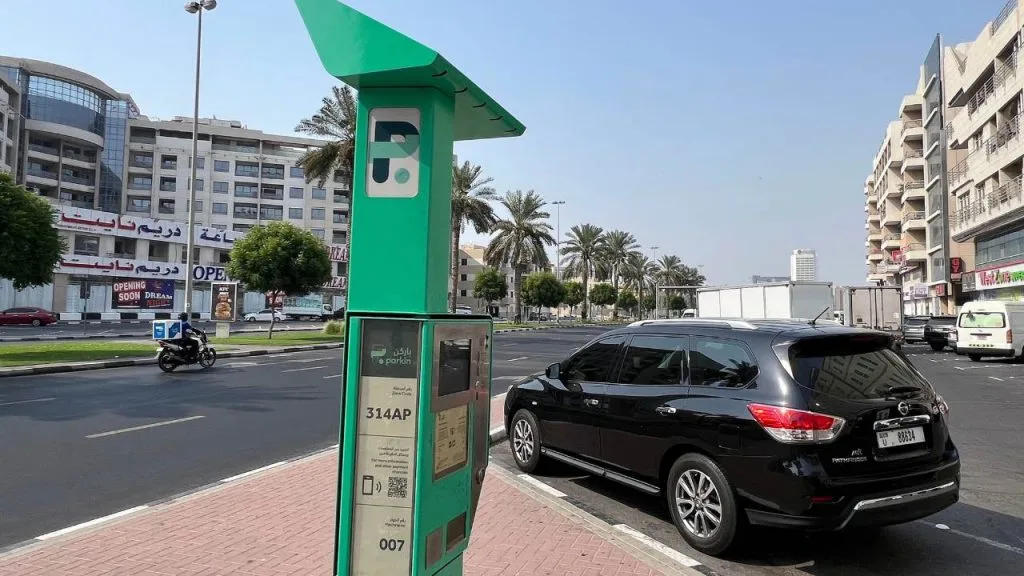
SMS payments go to 7275. WhatsApp payments use +971 58 800 9090. The correct method depends on the operator shown beside your parking space.
Checked on 28 September 2026. Parkin introduced 5% VAT on its parking services from June 2026. It also announced a move away from cash at meters. Older advice about coins and tax-free prices may therefore be outdated.
Check These Details Before You Pay
First, read the sign beside your parking bay. Look for the operator, zone code, and charging hours. A nearby private car park may follow different rules.
You need your plate number and its code or category. Vehicles registered elsewhere also need the correct registration source. Keep a photo of your rental car’s plate for reference.
Find the Parking Zone Code
Look for a code such as 335A on the parking sign. Enter the full code, including its final letter. Never copy a code from another street without checking it.
Your phone may suggest a nearby zone using your location. Compare that suggestion with the sign beside your vehicle. Buildings and nearby roads can affect the suggested position.
Check Your Vehicle Details
Your plate code and parking zone are separate details. One identifies your vehicle, while the other identifies the location. Mixing them up can leave your car without valid payment.
Also check whether the bay has any access restrictions. A payment does not allow parking in a reserved space. Accessible bays require the relevant permission.
Compare Your Parking Payment Options
Choose a method you can complete before walking away. Keep another option ready if the first payment fails. Always review the final amount and session details.
| Method | What you need | Main point |
| SMS | Supported UAE mobile service and sufficient balance | Send the correct format to 7275; a messaging fee applies. |
| Internet access and the official chat | Follow the payment prompts and check confirmation. | |
| Official app or website | Internet access and an accepted payment method | Check your selected vehicle and zone. |
| nol-enabled meter | A supported card with enough credit | Follow the instructions on that machine. |
| Private car park payment | The operator’s accepted method | Public street-parking payments may not apply. |
Pay by SMS to 7275
If you need to know how to put parking in dubai by sms, start with the sign. Write down the zone before opening your messages. Then check the vehicle’s plate details.










For a typical Dubai plate, use this structure:
Plate code and number + space + zone code + space + hours
For example, A12345 335A 1 requests one hour in zone 335A. Here, A12345 represents the vehicle’s plate. Replace every example detail with your own information.
1. Open a new message on your phone.
2. Enter 7275 as the recipient.
3. Type the plate, zone, and duration with spaces.
4. Send the message and read the reply.
5. Check the confirmed expiry time before leaving.
The service normally adds a 30-fils messaging charge. Keep enough credit for both parking and that charge. Your payment must succeed before the session becomes valid.
Check the Confirmation Message
Sending a text does not prove that parking is paid. Read the reply for errors or rejected details. Keep the successful confirmation until your visit ends.
Check the plate, zone, and expiry time in that message. Correct any mismatch through the official payment service. Do not assume a wrong-zone payment covers your actual bay.
Before driving between attractions, browse our Dubai travel guides. Check Burj Khalifa parking and directions for a Downtown visit. Plan your arrival before choosing a parking method.
For a coastal stop, read our beach parking guide. Our Kite Beach visitor guide also helps you plan the journey. Follow the signs at your chosen car park on arrival.
Use a Vehicle Registered in Another Emirate
You can pay for Dubai parking with a non-Dubai plate. The registration source must match the vehicle. Your parking location still determines the payment service.
Abu Dhabi Vehicle Plates
For an Abu Dhabi car, include AUH and the plate category. A published example is AUH13 12345 335A 1. It represents category 13, plate 12345, and one parking hour.
Sharjah Vehicle Plates
For a Sharjah vehicle, use the SHJ registration prefix. A published example is SHJ2 12345 335A 2. Replace category 2 and all other details with your own.
Ajman and Other UAE Vehicle Plates
Ajman vehicles use AJM as their registration source. Plate categories can affect the required entry. Use the official app’s separate fields if the SMS format is unclear.
Other registration prefixes include RAK, FUJ, and UAQ. These identify Ras Al Khaimah, Fujairah, and Umm Al Quwain. Do not remove a required plate category or guess its value.
The published SMS examples explain common Abu Dhabi and Sharjah formats. Examples are not valid tickets for your vehicle. Always check the service’s response before leaving.
Pay Through WhatsApp
Open a chat with RTA’s virtual assistant, Mahboub. The official number is +971 58 800 9090. Use the full international number when saving the contact.
1. Open WhatsApp and select the official contact.
2. Send your plate, zone, and parking duration.
3. Follow the payment instructions shown in the chat.
4. Review the charge before completing payment.
5. Check that your parking session is confirmed.
RTA gives A00000 000A 2 as a format example. These are placeholder details, not a location to copy. Replace them with your plate and the actual zone.
WhatsApp avoids the regular 30-fils SMS payment charge. You still pay the parking fee and applicable tax. Internet access is needed to complete the chat.
You can confirm the contact on RTA’s WhatsApp parking page. Follow the payment choices offered during your session. Keep the confirmation available until you return.
Pay Through Official Apps or the Website
Online payment helps when plate formatting feels confusing. Separate fields let you select your registration details. You can also review the zone before paying.
Parkin App and Website
Open the official Parkin payment service. Select the vehicle, parking area, and required duration. Review the displayed total before confirming your purchase.
Add your registration source when entering a new vehicle. Check every digit if you use a rental car. Avoid selecting an older vehicle saved in your account.
Parkin also provides a wallet for parking payments. Add funds through the options shown in your account. Check the active session after the payment finishes.
RTA Dubai and DubaiNow
These apps also offer public parking services. Open the parking section and select your vehicle. Choose the correct zone and available duration.
Use a payment method shown within the app. Finish any required verification and check the result. A pending bank transaction alone does not confirm a parking ticket.
Save your vehicle only after checking its details. This reduces repeated typing on later visits. Remove rental vehicles when you no longer use them.
Pay at a Parking Meter
A supported meter is useful when mobile payment is inconvenient. Read its instructions before choosing your parking duration. Check which cards or payment options it accepts.
Use a nol Card
You can use a nol card at compatible parking meters. Make sure the card has enough available credit. Follow the machine’s prompts for vehicle details and duration.
Present the card when the meter asks for payment. Wait for the transaction to finish successfully. Follow any receipt or ticket instructions shown on screen.
Check Cash and Bank Card Availability
Parkin announced a cash payment phase-out from June 2026. Its announcement says nol payments remain available. Do not rely on coins as your only backup.
Private facilities may offer different payment choices. Use a bank card only where the machine supports it. Check the displayed instructions before starting a transaction.
Parking arrangements also vary along the coast. Check our Jumeirah Public Beach guide before planning a stop. Our Sunset Beach guide covers another nearby option.
You can also compare guided Dubai city tours. Check whether your chosen tour includes transport or pickup. That may reduce the number of parking stops you need.
Check Parking Fees and Paid Hours
Dubai parking prices depend on the zone and time. Standard, premium, and special facilities have different tariffs. Read the sign and review your final payment total.
Standard and Premium Parking
The variable tariff policy sets peak periods from 8–10 AM and 4–8 PM. Its off-peak periods are 10 AM–4 PM and 8–10 PM. The policy excludes Sundays and public holidays from peak pricing.
The examples below combine published base tariffs with 5% VAT. They are calculations, not prices for every location. Your selected zone’s displayed charge takes priority.
| Example | Base charge | With 5% VAT |
| One hour at a standard AED 4 peak tariff | AED 4.00 | AED 4.20 |
| One hour at a premium AED 6 peak tariff | AED 6.00 | AED 6.30 |
| One hour at an AED 2 off-peak tariff | AED 2.00 | AED 2.10 |
Parkin’s variable tariff announcement explains the pricing framework. Its May 2026 VAT disclosure confirms the tax change. Avoid adding VAT again if the displayed total already includes it.
Sundays and Special Locations
Many public street-parking zones have free Sunday and overnight periods. That does not make every Dubai car park free. Multi-storey, private, and special locations can have separate charges.
Check current holiday announcements before relying on free parking. Event areas may also apply different tariffs. Ramadan schedules need checking for the relevant year.
Extend Your Parking Session
Renew your parking before the confirmed expiry time. For SMS sessions, follow the reminder’s renewal instructions. The usual extension reply is Y to the parking service.
For an app payment, open your active session. Select the available renewal or extension option. Check the new expiry time after payment succeeds.
Your zone may limit the maximum parking stay. An extension cannot override a posted restriction. A move to another zone requires checking payment again.
Choose a Monthly or Seasonal Subscription
If you are checking how to pay monthly parking in dubai, compare coverage first. A cheaper permit is useful only where it applies. Check the actual bays you use each week.
1. Open the official subscription or seasonal permit service.
2. Choose the required area and available subscription period.
3. Enter the eligible vehicle details.
4. Select the activation date.
5. Review coverage, exclusions, and the tax-inclusive total.
6. Pay and confirm that the permit is active.
Check Coverage and Vehicle Eligibility
Permit types differ across public lots and development areas. Monthly, quarterly, half-yearly, or annual choices depend on the product. Use the live quote rather than an old price table.
The RTA seasonal permit application lists two main categories. General covers designated A, B, C, and D zones. Areas covers designated B and D zones.
Listed exclusions include JLT, Tecom, Dubai Silicon Oasis, and Dubai Healthcare City. Other location exceptions may also apply. Check your exact destination before buying.
The application allows up to three qualifying Dubai vehicles per permit. They must share the same traffic file. Only one vehicle can use that permit at a time.
Other-emirate plates and company traffic files have a one-vehicle limit there. Read the conditions for your chosen product before paying. A general subscription does not automatically reserve a specific space.
Compare the permit quote with your usual monthly spending. For example, AED 20 across 22 days totals AED 440. This is a budgeting example, not a published parking package.
Fix Failed Payments and Avoid Common Mistakes
If payment fails, check the vehicle and zone first. Then check your balance or card authorisation. Retry through an official channel or use another supported method.
Do not assume a delayed reply gives free parking time. Check whether an active ticket already exists before paying twice. Contact the operator if the payment status remains unclear.
| Problem | What to check |
| Rejected SMS | Plate source, category, spaces, zone, and duration. |
| No confirmation | Active-session history and the payment response. |
| Wrong saved vehicle | Plate details selected before payment. |
| Parking expired | Renewal confirmation and the latest expiry time. |
| Payment made in another zone | The actual sign beside your vehicle. |
Use the contact information within the official service. RTA’s general customer support number is 800 9090. For a private facility, contact its named operator.
Check Separate Rules at Beaches and Attractions
Mall, hotel, and beach facilities may have their own systems. Some use plate recognition or ticketless payment. Others require validation after shopping or dining.
Salik-linked parking applies only at participating facilities. It does not automatically cover every public street bay. Read the entry signs and check your rental agreement where relevant.
Ask the venue how parking validation works before paying. Keep any receipt needed to claim the benefit. Check the exit deadline after validation is applied.
Visiting Abu Dhabi or Sharjah
The city where you park determines the payment system. Your plate’s home emirate does not change that. Dubai SMS instructions do not apply automatically across the UAE.
When checking how to pay parking in abu dhabi, use official MAWAQiF guidance. Check the bay type and local charging rules. Do not reuse a Dubai zone code.
For how to pay parking in sharjah, consult the municipality’s service. Its official SMS parking guidance identifies 5566 as the destination. Follow its local format rather than the Dubai message structure.
Frequently Asked Questions
What Is the SMS Number for Dubai Parking?
Send the parking message to 7275. Include the correct plate details, zone, and duration. Wait for successful confirmation before leaving.
Can I Pay Through WhatsApp Without the SMS Fee?
Yes, the official WhatsApp service avoids the regular 30-fils SMS charge. Use +971 58 800 9090. Parking fees and applicable tax still apply.
Can I Use an Abu Dhabi, Sharjah, or Ajman Plate?
Yes, select the correct registration source and plate details. The required format can differ by plate category. Use the official app if you are unsure.
How Can I Extend My Parking Time?
Follow the SMS renewal prompt or extend through your active app session. Complete the renewal before expiry. Check the new end time and zone limits.
Is Public Parking Free on Sundays and Holidays?
Many public street zones have free periods, subject to official rules. Private and multi-storey facilities can still charge. Check the sign and current holiday announcement.
What Should I Do If Payment Confirmation Does Not Arrive?
Check your details, payment status, and active tickets. Use another official method if the first attempt failed. Contact support if the result remains unclear.
Can Tourists Pay Without a UAE Mobile Number?
A compatible nol-enabled meter provides an option without mobile SMS. Online services may also work with accepted account and payment details. Check their requirements before relying on them.
