

Quick Facts Table
| Detail | Information |
| Official site | sewa.gov.ae |
| Mobile app | SEWA Smart App (iOS and Android) |
| SMS shortcut | Consumer ID to 7011 |
| Email inquiry | info@sewa.gov.ae |
| Bill components | Electricity, water, gas, housing fee |
| Payment methods | Card, e-Dirham, bank transfer, direct debit, cash at kiosks |
| Card payment fee | Around 1 percent |
| Minimum online payment | AED 10 |
| Billing support | 600 566 665 |
| Emergency line | 991 |
What Is SEWA
SEWA is the Sharjah Electricity, Water and Gas Authority. It provides power, water, and natural gas services across the Emirate of Sharjah. SEWA serves close to two million customers with both residential and commercial connections. Bills come out monthly. Every resident and business should track this bill on time to avoid disconnection.
What Your Bill Covers
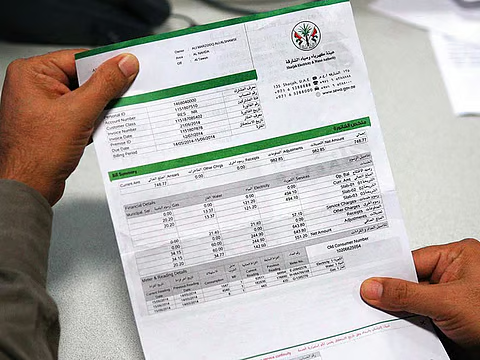
A SEWA bill covers more than just power. Extra charges also sit on the same statement.
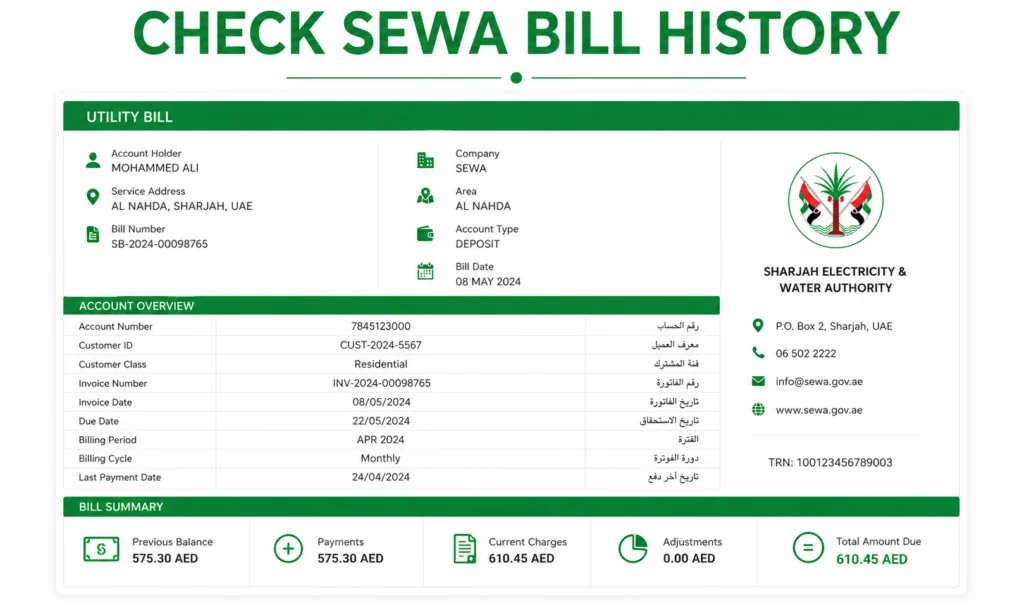
The main components are electricity units, water units, and gas usage if your property has it. Some accounts also include a fixed housing fee and a small service charge. Each unit is billed by consumption slab, so heavy users pay a higher per-unit rate. Reading the bill from top to bottom helps you spot any unusual spike in usage. Bills are available in both Arabic and English.
Check Via The SEWA Website
The sewa.gov.ae website is the main channel. It works from any browser on desktop or mobile.
Follow these simple steps. Open sewa.gov.ae in your browser. Click Customer Services, then Bill Inquiry. Pick consumer number or account number as your search type. Enter your details and clear the CAPTCHA. Press Search, and your bill loads in seconds. A quick sewa bill online lookup here also shows past bills for the last year. This process is as safe as a fab balance check page, since it uses HTTPS and no login is needed for the guest view.










Check Without Login
Some users want a fast view without signing up for an account. SEWA supports this in guest mode.
Open the Bill Inquiry page and pick guest access. Enter your consumer or account number. Clear the security check and press Search. Your current bill appears with the amount and due date. A sharjah sewa bill check online without login option like this suits tenants and short-term users. You can also print or save the page as a PDF for your records.
Check Via The SEWA Smart App
The SEWA Smart App is the fastest option on your phone. It also handles payment and daily usage tracking.
Download the SEWA Smart App from the App Store or Google Play. Log in with your SEWA credentials, UAE Pass, Face ID, or fingerprint. Your home screen shows your current bill and any past dues. Tap Bills to view or download past bills for the last twelve months. Push alerts help you catch the due date before any penalty kicks in.
Check Via SMS To 7011
SMS works well in low-signal areas or when you have no internet. It also works on basic phones.
Open your Messages app. Type your consumer ID in the message body. Send it to 7011 from any UAE network. You will get an SMS reply with your current bill amount and due date within a few seconds. This is the go-to option for elderly users or anyone without a smartphone app. Standard SMS charges may apply on some plans.
Check Via Email And Customer Care
SEWA also supports email and phone options for bill queries. These work best for detailed questions.
Send your consumer number or account number to info@sewa.gov.ae. You will get a reply with your bill details within one working day. Or call 600 566 665 for billing inquiries. For power or water emergencies, dial 991. The SEWA call centre also helps if you forgot your consumer number, since staff can pull your record with your Emirates ID.
Check With Consumer Number
Your consumer number sits at the top of every SEWA bill. This is the fastest search method for most users.
Enter your consumer number on any of the channels above. A sewa bill check with consumer number returns your bill in seconds. Guest users see the current amount and due date without a password. Registered users also get twelve months of history and consumption charts. Signing in through UAE Pass works like a secure fab salary check session inside a banking app.
Check Previous Month Bill
Sometimes you need to compare last month with this month to spot a trend. SEWA makes this simple.
Log in to the website or Smart App with your credentials. Go to Bills History or Past Bills. A sewa bill check previous month shows the amount, usage in units, and any late fee if paid after due date. Landlords often ask for the last three bills before renewing a lease, so keep them saved. Comparing consumption month over month helps you cut costs, much like a monthly lulu balance check shows spending trends on other cards.
Check Your Electricity Usage
Understanding your usage is the first step to lowering bills. SEWA gives you plenty of tools for this.
The Smart App shows a daily and monthly usage chart on the home screen. Log in on the website to view the same chart in more detail. A quick check bill electricity section on the website also shows unit consumption slabs. This helps you see if you are in a higher tariff band due to heavy use. Small habit changes like LED bulbs and lower AC temperature settings can bring the total down.
Pay Your SEWA Bill
Payment is quick once you see your bill. Several channels work across the Emirate.
Open the SEWA website, Smart App, or DubaiNow app and tap Pay Now. Choose your card, e-Dirham, or bank transfer as the method. A sewa bill payment via the ePay portal is instant and applies a small card fee of about one percent. Bank transfer and direct debit skip this fee entirely. Kiosks and service centres accept cash for offline payments. Payment timing works much like a al ansari balance check, where the confirmation shows only after the transfer clears.
Late Payment And Disconnection Rules
SEWA has clear rules for late payment. Acting early saves you from extra charges.
Every bill shows a due date on the front page. Late payment adds a small penalty starting from the day after due date. Repeated missed payments can trigger a disconnection notice, usually after two cycles. Reconnection needs full clearance of dues plus a service fee. Setting up autopay through your bank is the easiest way to avoid this trouble.
Troubleshooting: Bill Not Showing
Sometimes a bill does not appear right away after the cycle. Common causes have simple fixes.
Refresh the website or Smart App after a minute. Check that you entered the correct consumer or account number. Bills usually appear online within one to two days after the cycle closes. Bus and metro travellers can track prepaid balance the same way through the hafilat card balance check service. Delays here are similar to a ratibi card balance check, where a top-up takes a short while to reflect after transfer.
Utility and traffic systems are separate. Use an rta fine check on rta.ae for Dubai traffic penalties. A dubai police fine check on the police site handles police-issued fines the same way. If your SEWA bill still does not appear after three days, call 600 566 665 for direct help. Keep your Emirates ID and consumer number handy for verification.
Safety And Compliance Tips
Protect your account with a few simple habits. Only use the official sewa.gov.ae site or the SEWA Smart App. Never share your account password or OTP with anyone. Turn on paperless billing to skip mail delays and save paper. Set up autopay through your bank to avoid late fees for good. Check your monthly usage chart to spot any unusual jump.
Frequently Asked Questions
How can I check my utility bill online?
Open sewa.gov.ae and click Bill Inquiry. Enter your consumer or account number and clear the CAPTCHA. Your bill loads in seconds.
Can I check my SEWA bill without login?
Yes. The Bill Inquiry page works in guest mode. Enter your consumer or account number to see the current bill without any password.
How do I find my SEWA consumer number?
Look at the top of any past SEWA bill or email. You can also call 600 566 665 with your Emirates ID, and the agent will pull your number.
Can I check my SEWA bill by SMS?
Yes. Send your consumer ID to 7011 from any UAE network. You will get an SMS reply with your bill amount and due date within seconds.
Is there a fee for online payment?
Yes. Card payments add about one percent to the amount. Bank transfer and direct debit skip this fee entirely.
What happens if I miss the SEWA payment date?
A late fee starts from the day after due date. Repeated misses over two cycles can lead to a service disconnection notice.
Can I download my SEWA bill as a PDF?
Yes. Open the bill on the website or Smart App and tap Download. Choose PDF format for easy sharing and record keeping.
Set up autopay on your bank app or turn on paperless billing to save time every month. Keep the last three bills saved for lease and claim purposes. A quick sewa bill check habit at the start of each month keeps you ahead of due dates and helps you spot any surprise jump in usage right away.
