

Quick Facts Table
| Detail | Information |
| Official site | dewa.gov.ae |
| Mobile apps | DEWA Smart App, DubaiNow (iOS and Android) |
| Search options | Account number, premise number |
| Login options | Registered credentials, UAE Pass |
| Bill components | Electricity, water, housing fee, sewerage, fuel surcharge |
| Payment methods | Visa, Mastercard, Apple Pay, Samsung Pay, bank apps, ATM |
| Green bill format | PDF sent via email each month |
| Support | 991 (from any UAE number) |
| Website customer service | Live chat on dewa.gov.ae |
| Response time | Bills sync within 1 to 2 days after cycle close |
What Is DEWA And The Green Bill
DEWA is the Dubai Electricity and Water Authority. It provides power and water to every home and business across the city. Bills come out monthly. A dewa green bill is sent by email as a PDF instead of a paper copy. This saves paper and makes it easy to store bills on your phone. Every resident should track this bill on time.
What Is In A DEWA Bill
A DEWA bill covers more than just power and water. Extra fees also sit on the same statement.
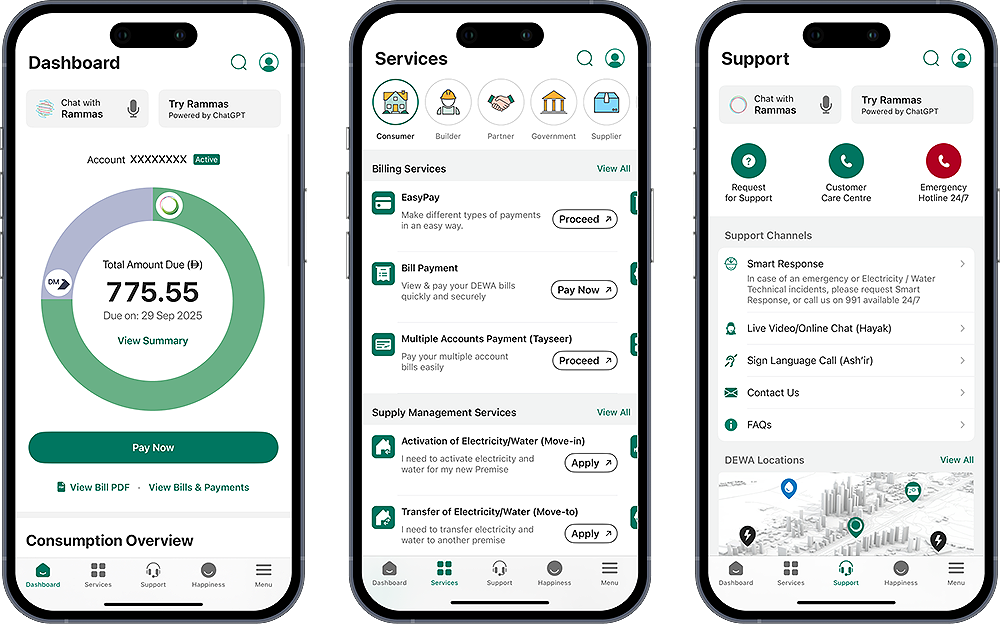
The main components are electricity charges, water charges, and the Dubai Municipality housing fee. Some accounts also carry a fuel surcharge and a small sewerage fee. A quick look at your dewa bill details section shows every line item and the exact rate for the month. Understanding the split helps you spot any unusual jump in usage. Bills come in both Arabic and English on the same page.
Check Via The DEWA Website
The DEWA website is the main channel. It works from any browser without a login for the guest view.










Follow these simple steps. Open dewa.gov.ae in your browser. Click Consumer, then Billing, then View Bill. Pick account or premise number as the search type. Enter your number and clear the CAPTCHA. Press Enquire, and your bill loads on screen. A dewa bill check online run here shows the current amount and any past dues. This process is as safe as a fab balance check page, since it uses HTTPS and PIN-protected access.
Check Without Login
Some users want a fast look at the bill without setting up an account. DEWA supports this for guests.
Open the same View Bill page. Pick guest mode from the top of the form. Enter your account number or premise number. Clear the security check. Your bill appears in seconds without any password or OTP. This dewa bill check online dubai without login option is ideal for tenants who want to see the amount before payment. Save the reference number if you plan to pay via bank transfer later.
Check Via The DEWA Smart App
The DEWA Smart App is the fastest option on your phone. It also lets you track daily usage.
Download the DEWA Smart App from the App Store or Google Play. Sign in with your registered credentials or use UAE Pass. Tap My Bills or Billing History on the home screen. Your current and past bills load right away. You can also view daily electricity and water usage charts. Push alerts keep you updated when a new bill is ready.
Check Via The DubaiNow App
DubaiNow is the unified government services app for Dubai. It groups DEWA with Salik, RTA, and other services.
Download the DubaiNow App from the App Store or Google Play. Log in with UAE Pass. Go to Utilities, then tap DEWA. Select View Bill to see current charges and past bills. Signing in through UAE Pass here works like a secure fab salary check session inside a banking app. The same app also handles traffic fines and driving licence tasks.
Check By Account Number
Your account number sits at the top of every bill. This is the fastest search method for most users.
Enter your account number on any of the three channels above. A dewa account number check online returns your bill in seconds. Guest users can view the bill without a password. Registered users see extra options like usage trends and monthly comparison. A dewa bill payment by account number option also appears on the same screen for quick payment. This route works even if you are helping a family member from a different device, similar to a lulu balance check at a store counter.
Check By Premise Number
Premise number is another way to find your bill. Use this if you do not remember your account number.
Every DEWA-linked address has a unique premise number. Pick premise from the search options and enter your number. Your bill loads with the same detail as the account number search. DEWA also offers a Display Premise Number service if you have forgotten it. Enter your account number there to reveal the linked premise number.
Download Your DEWA Bill
Sometimes you need a copy of the bill for records or reimbursement. DEWA makes downloading simple.
Log in to the DEWA website or Smart App. Open the bill you want to save. Tap Download or the printer icon. Choose PDF as the format for easy sharing. A quick download dewa bill routine at the end of every month keeps your records ready for tax or claim purposes. Landlords often ask for the last three bills before renewing a lease, so keep them handy.
Pay Your DEWA Bill
Payment is quick once you see your bill. Several channels work across the country.
Open the DEWA website, Smart App, or DubaiNow and tap Pay Now. Choose Quick Pay if you do not want to log in. Enter your card details and confirm the amount. Visa, Mastercard, Apple Pay, and Samsung Pay all work here. A dewa bill payment via the ePay portal is instant and free. Payment through a bank app or an ATM also works, and clears within one working day. Payment timing works much like a al ansari balance check, where the confirmation shows only after the transfer clears.
Late Payment And Disconnection
DEWA has clear rules for late payment. Acting early saves you from extra charges.
Bills come out monthly with a due date on the same page. Late payment adds a small penalty starting from the day after due date. Repeated missed payments can lead to a service disconnection notice. Reconnection needs a full clearance of dues plus a service fee. Setting up autopay through your bank is the easiest way to avoid this trouble.
Troubleshooting: Bill Not Showing
Sometimes a bill does not appear right away after the cycle. Common issues have simple fixes.
Refresh the page or app after a minute. Check that you entered the correct account or premise number. Bills usually appear online within one to two days after the cycle closes. Bus and metro travellers can track prepaid balance the same way through the hafilat card balance check service. Delays here are similar to a ratibi card balance check, where a top-up takes a short while to reflect after the transfer.
Utility and traffic systems are separate. Use an rta fine check on rta.ae for Dubai traffic penalties. A dubai police fine check on the police site handles police-issued fines the same way. If your DEWA bill still does not appear after three days, call 991 for direct help. Keep your Emirates ID and account number handy for verification.
Safety And Compliance Tips
Protect your account with a few simple habits. Only use the official dewa.gov.ae site or the DEWA Smart App. Never share your account password or OTP with anyone. Turn on paperless billing to skip mail delays and save paper. Set up autopay to skip late fees for good. Check your monthly usage chart to spot any unusual spike.
Frequently Asked Questions
How can I check my DEWA bill online?
Visit dewa.gov.ae and click View Bill. Enter your account or premise number, clear the CAPTCHA, and press Enquire. Your bill loads in seconds.
Can I view my DEWA bill without login?
Yes. The View Bill page on dewa.gov.ae works in guest mode. Enter your account or premise number to see the bill without any password.
How do I find my DEWA account number?
Look at the top of any past DEWA bill or email. You can also log in to the Smart App or ask via the live chat on dewa.gov.ae.
Can I download my DEWA bill as a PDF?
Yes. Open the bill on the website or Smart App and tap Download. Choose PDF format for easy sharing and record keeping.
What happens if I miss the payment date?
A late fee starts from the day after due date. Repeated misses can lead to a service disconnection notice, so autopay is a smart choice.
Which apps can I use for DEWA services?
The DEWA Smart App and the DubaiNow app both handle bill check and payment. DubaiNow also covers other government services like Salik and RTA.
Is Quick Pay safe on DEWA’s website?
Yes. Quick Pay runs on a secure HTTPS connection with card tokenisation. Always check the padlock icon in your browser before entering card details.
Set up autopay on your bank app or turn on paperless billing to save time every month. Keep a folder of downloaded PDFs for lease or claim purposes. A quick dewa bill check habit at the start of each month keeps you ahead of due dates and helps you spot any surprise jump in usage early.
